Dexterus Power Point Template: A Comprehensive Overview
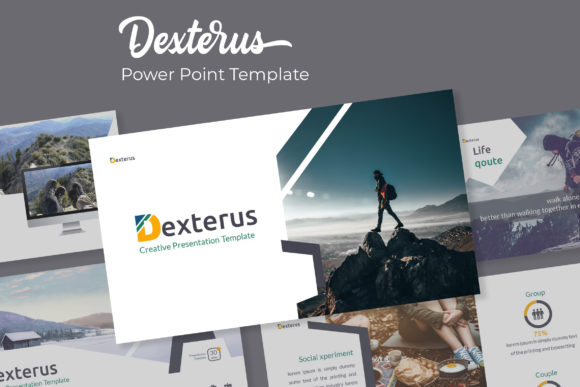
The Dexterus Power Point Template is a versatile and professionally designed resource for individuals and businesses looking to create visually appealing presentations. With 150 total slides, it offers a wide range of layouts and design elements that cater to various presentation needs. This template stands out due to its attention to detail, flexibility, and user-friendly features, making it a valuable tool for anyone involved in creating PowerPoint presentations.
Key Features of the Dexterus Power Point Template
The Dexterus Power Point Template is designed with a focus on usability and aesthetics. It includes five pre-made color schemes, each containing 30 slides, allowing users to choose a style that best fits their brand or presentation theme. These color variations ensure that the template remains adaptable across different industries and purposes.
In addition to the color options, the template features handcrafted infographics that can be easily integrated into presentations. These infographics are designed to convey complex information in a clear and engaging manner, making them ideal for data-driven presentations. The use of pixel-perfect illustrations further enhances the visual appeal of the template, ensuring that every slide looks polished and professional.
The template also includes section break slides, which help organize content into distinct sections. This feature is particularly useful for long presentations, as it allows presenters to navigate through different topics seamlessly. The gallery and portfolio slides provide a structured way to showcase projects, products, or achievements, making the template suitable for both business and academic settings.
Customization and Flexibility
A standout feature of the Dexterus Power Point Template is its resizable and editable graphic picture placeholders. These placeholders allow users to easily insert images, charts, or other visual elements without disrupting the overall design. The drag-and-drop functionality ensures that customization is straightforward, even for those with limited design experience.
The template is based on master slides, which means that any changes made to the master slide will automatically update all related slides. This feature saves time and ensures consistency throughout the presentation. Users can also modify fonts, colors, and layout styles to match their specific requirements.
Each template comes with a readme file that provides detailed instructions on how to use the template effectively. Additionally, the first font used in the template is a free font, and a download link is included for convenience. This makes the template accessible to users who may not have access to premium fonts.
What’s Included in the Package
The Dexterus Power Point Template package includes five PPTX files, each available in widescreen format. This ensures compatibility with modern projectors and display devices. The inclusion of multiple color variations allows users to experiment with different visual styles without having to start from scratch.
It is important to note that the photographs or pictures used in the preview are for illustration purposes only and are not included in the template. This means that users will need to source their own images or use stock photography to complete their presentations. However, this also gives users greater control over the content and branding of their slides.
When to Choose the Dexterus Power Point Template
The Dexterus Power Point Template is an excellent choice for individuals or teams looking for a reliable and customizable presentation tool. Its extensive slide count and variety of design options make it suitable for a wide range of scenarios, including business proposals, academic presentations, marketing campaigns, and product launches.
For users who prioritize visual consistency and ease of use, the Dexterus template offers a streamlined approach to slide creation. The ability to customize elements such as colors, fonts, and graphics makes it a flexible option for both novice and experienced users. Additionally, the inclusion of section break slides and portfolio layouts adds value for presenters who need to structure their content effectively.
Considerations and Limitations
While the Dexterus Power Point Template offers many advantages, it may not be the best fit for every user. Those who require highly specialized design elements or unique formatting may find that the template has certain limitations. For example, the pre-designed layouts may not accommodate highly creative or unconventional presentation styles.
Users who are not familiar with PowerPoint's advanced features may need some time to fully utilize the template's capabilities. However, the provided readme file and clear structure of the template help mitigate this learning curve. It is also worth noting that the lack of included images means users will need to source their own media, which could be a consideration for those looking for a completely ready-to-use solution.
Comparing Dexterus with Other Presentation Tools
When compared to other PowerPoint templates or presentation tools, the Dexterus template holds its own due to its comprehensive design and flexibility. Many similar templates may offer fewer slides or less customization, making the Dexterus template a more robust option for users with diverse needs.
Unlike some templates that focus on a single color scheme or style, the Dexterus template provides multiple variations, allowing users to explore different visual identities. This versatility can be especially beneficial for businesses that want to maintain a consistent brand image across multiple presentations.
For users who prefer a more minimalistic approach, other templates may offer simpler designs with fewer features. However, the Dexterus template strikes a balance between functionality and aesthetics, making it a practical choice for most presentation scenarios.
Best Fit Scenarios
The Dexterus Power Point Template is particularly well-suited for professionals in fields such as marketing, education, and business development. Its structured layouts and customizable elements make it ideal for presenting data, sharing project updates, or delivering training sessions.
For students or educators, the template's gallery and portfolio slides can be used to showcase research, assignments, or classroom projects. The inclusion of infographics also supports the presentation of complex concepts in an engaging way.
Entrepreneurs and startups may find the template useful for pitching ideas, launching products, or presenting business plans. The ability to adjust the design to reflect a brand's identity ensures that the presentation aligns with the company's overall image.
Conclusion
The Dexterus Power Point Template is a well-rounded and practical solution for creating professional-looking presentations. Its combination of design flexibility, customization options, and user-friendly features makes it a valuable resource for a wide range of users. Whether you're preparing a business proposal, academic presentation, or marketing pitch, the Dexterus template offers the tools needed to create a compelling and visually appealing slideshow.