Quadrat Keynote Template: A Versatile Presentation Solution
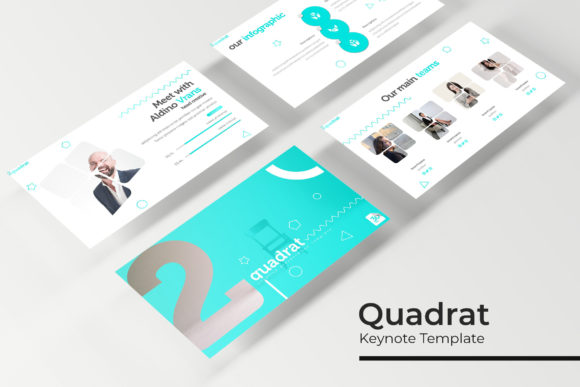
Presentations are a staple of modern communication, yet many professionals and creators struggle to find templates that balance visual appeal with practical flexibility. The Quadrat Keynote Template aims to fill that gap by offering a structured yet customizable system for building slides that look polished without requiring hours of design work. With 150 total slides spread across five premade color variations, this template set positions itself as more than just a background kit—it is a complete framework for telling stories, presenting data, and showcasing work.
What Makes the Quadrat Keynote Template Stand Out
At first glance, the Quadrat Keynote Template appears to be a clean, modern set of slides. But its real strength lies in the way it organizes content. The package includes five distinct PPTX files, each featuring 30 slides in a unique color variation. That means you get five separate templates, each with its own cohesive palette, but all following the same structural logic. This approach is helpful if you manage multiple clients, departments, or projects and want a consistent visual language without repeating the exact same color scheme every time.
Each of the five color variations is handcrafted, which shows in the subtle gradients, balanced contrasts, and thoughtful accent placement. Whether you lean toward cooler blues and grays or warmer tones, you have options that feel intentional rather than randomly generated. What is more, the graphics are pixel-perfect illustrations, so they scale cleanly across screens and projectors without looking fuzzy or distorted.
Master Slides and Drag-and-Drop Simplicity
A common frustration with presentation templates is the lack of real customization. You might find a design you like, only to realize you cannot adjust the layout without breaking the formatting. The Quadrat Keynote Template addresses this by building everything on master slides. This means the underlying slide structure stays intact even as you swap images, edit text, or change elements. Picture placeholders use a simple drag-and-drop mechanism, so you can drop in your own photography or graphics without wrestling with crooked alignment or broken proportions.
For anyone who has spent twenty minutes resizing an image to fit a template, this alone saves real time. The placeholders are already sized and positioned within the slide layout, so your content snaps into place. This feature is especially useful when you work under deadline pressure—say, preparing a pitch deck the night before a meeting or updating a quarterly report for stakeholders who expect clean visuals.
Core Features That Support Real-World Use
When evaluating a template, it helps to look beyond the preview images and consider how the features actually perform during a typical workflow. Here are the most practical aspects of this template set:
- 150 slides total across five color variations (30 slides each)
- Handcrafted infographics that are resizable and editable without losing clarity
- Section break slides to organize longer presentations into digestible chapters
- Gallery and portfolio slide layouts designed for showcasing images, case studies, or team members
- Resizable and editable graphics that adapt to your content rather than the other way around
- Pixel-perfect illustrations that maintain quality at different display sizes
- Widescreen format suitable for modern monitors, laptops, and projection systems
- Five PPTX files included, with a Readme file that provides the free font download link
Having five separate PPTX files rather than a single file with theme switchers makes it easier to keep your work organized. If you are building a presentation for a client who prefers a specific color identity, you can open the matching file from the start and avoid having to adjust colors manually later. The free font link in the Readme ensures you can match the typography shown in the demo without purchasing additional licenses.
Practical Applications Across Different Environments
Templates are only useful if they fit the context in which you work. The Quadrat Keynote Template is broad enough to serve multiple use cases, yet specific enough that each slide layout feels purposeful rather than generic.
Professional and Corporate Presentations
If you are a marketer preparing a campaign recap, the gallery slides let you show social media visuals, ad mockups, or event photos in a clean grid. The section break slides help you separate strategy, execution, and results so the audience can follow the narrative without getting lost. For quarterly business reviews, the handcrafted infographics can display revenue trends, growth percentages, or headcount changes in a way that looks executive-ready without requiring you to build charts from scratch.
Entrepreneurs pitching to investors will appreciate the portfolio-style slides for demonstrating previous work, client logos, or product screenshots. Because the template is based on master slides, you can reuse the same file for multiple versions of your deck—just swap out images and update numbers as your business evolves.
Educational and Training Settings
Educators and trainers often need to present information in clear, learnable chunks. The section break slides act as natural pause points, giving learners a moment to absorb one topic before moving to the next. The editable infographics can simplify complex concepts—like a step-by-step process, a cycle diagram, or a comparison matrix—without overwhelming the audience with dense text. If you teach or train regularly, having a consistent template also reduces the cognitive load for your students, because they learn to recognize where different types of information appear in your slides.
Creative Portfolios and Freelancer Showcases
Freelancers and creative professionals often need a presentation that reflects their personal style while remaining polished. The gallery and portfolio layouts in the Quadrat Keynote Template let you feature your best work without cluttering the slide. The drag-and-drop image placeholders make it easy to swap in new projects as your portfolio grows. Because the template offers five color variations, you can choose a palette that aligns with your brand or the tone of a specific proposal.
If you are a photographer, designer, or illustrator, the pixel-perfect illustrations in the template also complement your own visuals rather than competing with them. The overall aesthetic is clean and minimal, which gives your work room to stand out.
Bloggers and Digital Content Creators
Bloggers and online publishers often repurpose presentation content for social media, videos, or downloadable lead magnets. The widescreen format works well for YouTube thumbnails, Instagram carousels, or SlideShare uploads. Because the template is fully editable, you can adapt slide layouts into quote graphics, list posts, or step-by-step guides. The handcrafted infographics also work well for summarizing blog post takeaways in a visually appealing way that encourages social shares.
Efficiency and Workflow Benefits
Time is probably the most undervalued asset when it comes to presentation design. The Quadrat Keynote Template streamlines the process in several ways. First, the master slide structure means you can apply global changes—like adjusting a heading font or shifting a logo position—across all slides at once rather than editing each one individually. Second, the picture placeholders remove the need for manual cropping and alignment. You drag an image into the placeholder, and the template handles the rest.
Third, having five premade color files means you can test different moods without reworking the entire deck. If you feel the blue palette looks too corporate for a creative pitch, you can open the warmer color variation and see how it feels with your content. This kind of flexibility is especially useful when you are presenting to different audiences who may respond better to certain tones.
The inclusion of a Readme file with the free font download link also removes a common friction point. Many templates use custom fonts, and tracking down the correct one can be frustrating. Here, the link is provided upfront, so you can install the font and have the template render exactly as intended.
Considerations When Using the Quadrat Keynote Template
No template is a magic bullet, and it helps to know what the Quadrat Keynote Template does and does not include. The preview images use photographs and pictures that are not part of the download—they are for illustration only. That means you will need to supply your own images, which is standard for most premium templates but worth remembering if you expected stock photography to come with the package.
Because the template is delivered as PPTX files, you will need PowerPoint (or a compatible program like Google Slides or Keynote with conversion) to open and edit them. The template is built for widescreen format, which works well on most modern screens but may require slight adjustments if you are presenting on older 4:3 projectors.
The handcrafted infographics are editable, but you should take care when resizing them significantly. While the vector-based elements hold up well, extreme scaling may affect readability if you compress too much text into a small space. As with any template, it is a good idea to test your slides on the actual display you will use before a live presentation.
Final Thoughts on Selecting a Presentation Template
Choosing a keynote template really comes down to how well it matches your actual workflow. The Quadrat Keynote Template is a solid choice for anyone who needs a polished, adaptable system that works across multiple contexts. The five color variations, master slide foundation, and drag-and-drop placeholders reduce the friction that often turns presentation building into a chore. Whether you are a business owner preparing a board deck, a freelancer pitching your services, or an educator designing course materials, this template gives you structure without boxing you in.
The 150-slide count might seem overwhelming at first, but it is actually a resource—you do not have to use every slide. Pick the layouts that fit your story, and leave the rest. Over time, you will develop a mental map of which slide types work best for which kind of content, and building presentations will become faster with each use. That, more than any single feature, is what makes a template genuinely useful over the long run.