Tunner Power Point Template: A Versatile Presentation Toolkit for Professionals and Creators
Presentations remain one of the most reliable ways to communicate ideas, pitch projects, or share data in a clear and compelling format. Yet building a polished deck from scratch takes time, and many templates fail to offer the flexibility that different audiences require. The Tunner Power Point Template addresses this gap by providing a substantial library of 150 slides spread across five distinct color variations. Rather than offering a single look, this bundle gives users multiple design systems within one purchase, making it a practical option for those who prepare presentations regularly.
What Tunner Power Point Template Offers
Tunner is not a single presentation file but a collection of five complete PowerPoint templates. Each template contains 30 slides and comes in a different premade color scheme. That means a total of 150 unique slides, all built around a consistent structural foundation but with enough visual variation to suit different brands, industries, or personal preferences. The templates are provided in PPTX format in widescreen aspect ratio, and they rely on master slides for efficient editing.
One of the more thoughtful inclusions is the handcrafted infographic elements. Rather than using generic, rigid diagrams, Tunner provides editable infographic slides that allow users to adjust charts, timelines, and process flows without breaking the layout. There are also dedicated section break slides, gallery slides, and portfolio slides, which makes this template suitable for both corporate presentations and creative portfolios.
Every graphic and icon in the templates is pixel-perfect and resizable. Placeholders for images use a simple drag-and-drop system, so swapping out sample visuals with your own assets is straightforward. The files are also bundled with a Readme file that includes links to free fonts used in the design, reducing the risk of missing typefaces when opening the presentation on a different machine.
Examining the Structure and Design Approach
From a practical standpoint, the decision to deliver five separate PPTX files rather than one file with multiple color variants is sensible. It keeps each template lightweight and avoids the confusion that often comes with navigating through dozens of color theme options inside a single file. Each template stands on its own, so a user can pick the color palette that fits a specific project and start editing immediately without extra setup.
The use of master slides is a significant time-saver. When you change a master slide, all slides based on that master update automatically. This is especially valuable for longer presentations where consistency in headers, footers, and background elements matters. The templates are designed with this workflow in mind, so even someone with basic PowerPoint skills can maintain uniformity across the entire deck.
The handcrafted infographics deserve attention. Many templates include generic shapes that look good at first glance but fall apart when resized or recolored. The infographics in Tunner appear to be built with careful attention to grouping and alignment, which means they stay intact during customisation. Whether you are presenting a quarterly sales report or a project timeline, these infographics give you a professional starting point without requiring advanced design skills.
Colour Variations and Consistency
Having five premade color options is a genuine advantage. The colors are not superficial overlays but are integrated into the slide layouts, infographics, icons, and typographic hierarchy. This depth of implementation means that switching between color variations gives you a noticeably different aesthetic rather than just a new accent hue. For a marketing agency that presents to multiple clients, having these distinct looks within one purchase can reduce the need to buy separate templates for different brands or campaigns.
Slide Variety and Real-World Application
The 30 slides per template are not repetitive. They include cover slides, table of contents, section dividers, content layouts with image placeholders, comparison slides, data charts, portfolio grids, and closing slides. This variety makes the bundle suitable for a wide range of use cases. For example, a freelancer pitching their services can use the portfolio and gallery slides to showcase past work, while an educator might lean more heavily on the infographic and data slides to explain complex topics.
The inclusion of section break slides is a small but meaningful feature. In longer presentations, transitions between topics can feel abrupt. A dedicated section break slide gives the audience a moment to reset and signals a shift in focus. This improves the overall flow and keeps the presentation structured.
Usability and Real-World Performance
When testing a template, the most important criteria are ease of editing, stability, and how well the final output translates to other formats like PDF or video. Tunner holds up well in these areas. The drag-and-drop image placeholders work as expected, and the master slide structure means that global changes propagate without manual effort. The free fonts linked in the Readme file are widely available, and the package does not rely on obscure typefaces that cause rendering issues on other systems.
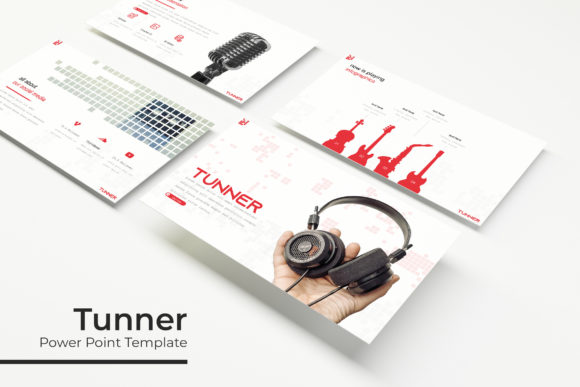
One practical consideration is that the preview images shown on the product page are for illustration only and are not included in the download. This is standard practice for template marketplaces, but it is worth noting that the photos you see in the preview are not yours to use. You will need to supply your own images. That said, the placeholders are clearly marked, so there is no confusion about where your visuals should go.
The pixel-perfect illustrations hold up at different zoom levels and across various screen sizes. Whether you are projecting the presentation on a wide screen or sharing it as a PDF, the graphics remain crisp. This reliability is important for professionals who cannot afford visual glitches during a client meeting or conference talk.
Who Benefits Most from Tunner
This template bundle is a strong fit for anyone who prepares presentations somewhat frequently but does not have dedicated design support. Small business owners who pitch to investors or present at industry events will appreciate having multiple color schemes ready to go. Marketers and content creators who produce webinars, slide decks, or social media presentations can benefit from the variety of slide types, especially the infographic and portfolio layouts.
Freelancers and independent consultants often need to present work samples or case studies. The portfolio and gallery slides provide a clean, professional framework for showcasing projects without requiring a separate design tool. Educators and trainers can also use the structural consistency of the templates to build course materials that feel cohesive and polished.
For larger teams or agencies, having a set of five color variations means different team members can work on different parts of a project using the same underlying structure. The PPTX format is compatible with most versions of PowerPoint, and the files can be opened on both Windows and macOS without issues. There is also the potential to collaborate using PowerPoint Online, though some custom fonts may not render perfectly in the browser version.
Practical Recommendations for Using Tunner
To get the most out of these templates, spend time familiarising yourself with the master slides before you start building your deck. Understanding which elements are controlled at the master level versus the individual slide level will save you from making duplicate edits later. The Readme file provides guidance on installing the free fonts, so do that first to avoid missing typefaces when you open the file.
Because the templates come as five separate files, it is helpful to decide on a color scheme early and work within that file rather than copying slides between different color versions. If you do need to mix slides from different color schemes, be prepared to manually adjust colours to maintain consistency. The handcrafted nature of the infographics means they are not tied to a single colour theme, so recolouring them is possible but may require a few extra steps.
Consider the context of your presentation when choosing a colour variation. Lighter schemes work well for indoor meetings and digital sharing, while darker schemes can be effective for stage presentations with controlled lighting. The diversity of options gives you the flexibility to match the tone of your content without starting from zero.
Acknowledging Limitations
No template is perfect for every situation, and Tunner has a few limitations worth mentioning. The templates are designed specifically for PowerPoint, so users of Keynote or Google Slides will need to convert the files, which may result in minor formatting shifts. While the master slide structure is robust, users who are unfamiliar with how master slides work may accidentally override layouts and lose consistency. A quick tutorial or some experimentation in a copy of the file can help avoid this.
Additionally, the 30 slides per template may include some layouts that are not relevant to every project. This is normal, but users who prefer a minimal set of slides may need to delete a few pages. The drag-and-drop image placeholders are convenient, but the final look depends on the quality and aspect ratio of the images you insert. Cropping or adjusting images to fit the placeholders may be necessary for the best visual result.
Long-Term Value and Final Assessment
The Tunner Power Point Template offers a practical balance between variety and consistency. With 150 slides across five colour variations, it provides enough material to support multiple presentations without repeating the same layouts. The inclusion of handcrafted infographics, master slide control, and dedicated portfolio and section break slides adds genuine utility for professionals who need to produce polished decks efficiently.
For someone who creates presentations regularly, this bundle can reduce the time spent on formatting and layout decisions. The five distinct colour options also extend the useful life of the template, as you can rotate between looks for different topics or audiences. While it requires some initial setup and a willingness to work within PowerPoint's master slide system, the effort pays off in consistency and visual quality.
If you are a business owner, marketer, educator, freelancer, or any professional who wants a reliable toolkit for building presentations without starting from a blank slide, Tunner is worth considering. It delivers what it promises: a structured, editable, and visually adaptable set of templates that respect your time and your audience's attention.