Moreless Power Point Template: Choosing Alignment Over Volume in Presentation Design
Presentations are rarely neutral. They either sharpen understanding or introduce friction. When you stand in front of an audience, whether in a boardroom, a webinar, or a client pitch, every slide either moves your argument forward or creates a distraction. The Moreless Power Point Template attempts to shift the balance toward clarity, offering a structured system that emphasizes consistency, visual hierarchy, and thoughtful variation. Understanding what this template provides, and more importantly, when and how to use it, can mean the difference between a presentation that informs and one that transforms.
What Moreless Power Point Template Actually Delivers
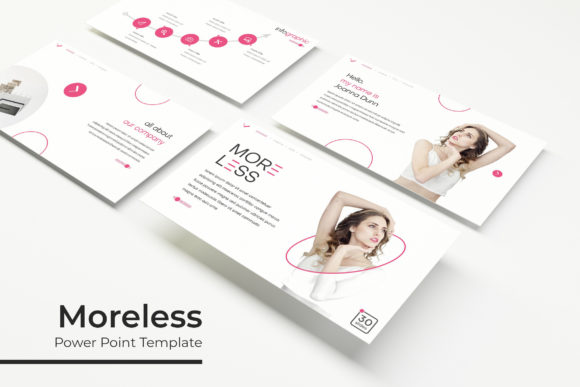
At its core, this template is a collection of 150 total slides distributed across five distinct color themes, each containing 30 slides. That structure alone signals a deliberate approach: rather than offering a single color scheme and forcing you to adapt your content to it, the template gives you five premade color variations. Each variation is a complete 30-slide deck with its own visual identity. This is not a one-size-fits-all solution; it is a selection of starting points.
The template also includes handcrafted infographics in PowerPoint, section break slides, gallery and portfolio slides, and resizable, editable graphics built on master slides. Pixel-perfect illustrations ensure that scaling elements does not degrade quality. For anyone who has spent hours adjusting alignment or rebuilding a chart because scaling broke the layout, this attention to detail matters. The drag-and-drop picture placeholders further reduce friction, allowing you to focus on content rather than formatting mechanics.
What you receive are five PPTX files in widescreen format, each corresponding to one premade color theme. A readme file and a font download link are included. Photographs in the preview are not part of the purchase, which is standard practice but worth noting if you plan to replicate the exact preview look.
Why Template Structure Matters for Strategic Communication
When you are planning a presentation, the default instinct is often to begin with content. That is not wrong, but content without structure creates cognitive load for your audience. A template like Moreless provides a prebuilt framework that separates visual decisions from content decisions. You can focus on your message, your data, your narrative sequence, and trust that the visual layer will hold together.
This separation is strategically useful. If you are an entrepreneur pitching to investors, your attention needs to be on the financial model, the competitive landscape, and the story behind your traction. The last thing you want is to wonder whether your slide backgrounds, fonts, and color accents are coherent across 20 slides. Having five premade color variations means you can test which palette aligns with your brand identity or the emotional tone of the pitch without rebuilding the deck from zero.
For marketers and creators, the gallery and portfolio slides are directly relevant. If your goal is to showcase work, case studies, or product shots, having dedicated slide types that support visual hierarchy and spacing saves time. The section break slides also help structure longer decks, giving audiences a mental reset before you shift topics. This is not decorative; it is functional signaling that improves retention.
Aligning Template Choice with Goals and Audience
The Moreless template is not a magic solution. Its value depends entirely on how well its structure matches your objectives. If you are building a data-heavy quarterly review for internal stakeholders, the infographic capabilities and resizable graphics become assets. If you are creating a one-off keynote for a conference, the portfolio slides might be less central, but the master slides and consistent theming still reduce production time.
Consider a small business owner preparing a pitch for a local partnership. They may not have a design background, and their brand identity might still be evolving. Having five color variations gives them room to test which palette resonates with their audience. They can run a quick A/B test with a trusted colleague, using the same content but different color themes, and gather feedback on perceived professionalism, warmth, or authority. That kind of strategic testing is only possible when the template offers genuine variation, not just minor hue shifts.
For freelancers and consultants, time is literally money. Spending four hours formatting slides instead of refining your proposal is a poor trade. The drag-and-drop picture placeholders and master slide architecture reduce that formatting time significantly. You can drop in your images, adjust the text, and trust that alignment remains consistent. The pixel-perfect illustrations also mean that if you need to increase the size of a graphic for emphasis, you will not end up with a blurry or pixelated element that undermines your credibility.
When Moreless Power Point Template Shines
This template is particularly well-suited for presentations that benefit from visual consistency without becoming monotonous. The five color variations allow you to switch between themes for different sections of a longer presentation, creating subtle psychological shifts. For example, a consulting deck might use a cool blue theme for the analysis section and transition to a warmer tone for recommendations. That visual shift reinforces the narrative shift.
The infographic elements are another area where the template adds strategic value. Handcrafted infographics in PowerPoint mean you do not need external tools to create compelling data visualizations. If you are presenting survey results, market trends, or process flows, these infographics can communicate complex information at a glance. The key is to use them selectively. Overloading a deck with infographics creates visual noise. But placing one well-chosen infographic on a key slide can anchor your audience’s understanding.
Section break slides are often undervalued. In a 30-minute presentation, your audience’s attention will naturally dip. A section break slide, with a distinct visual identity, signals a shift in topic and gives viewers a moment to reorient. This is especially useful in educational settings, training sessions, or long planning reviews where multiple topics are covered sequentially.
Risks of Using a Template Without Clear Intent
The most significant risk associated with any template, including Moreless, is that it can create the illusion of coherence while masking a lack of strategic thinking. A beautifully formatted slide with weak content still fails to persuade. If you drop your content into the template without considering your narrative arc, your audience’s primary takeaway may be that the slides looked nice, not that your argument was compelling.
Another risk is template fatigue. If you use the same color variation for every presentation, stakeholders may begin to associate that visual style with a particular type of content, potentially diluting its impact. The five color variations in Moreless give you room to rotate, but you must consciously choose which variation fits each context. Using a vibrant, warm theme for a serious financial review may create a mismatch that undermines your message.
There is also the risk of over-reliance on the template’s structure. Not every slide type in the 30-slide set will be relevant to every presentation. Including a portfolio slide when you have no visual work to showcase, or a gallery slide with low-quality images, weakens the overall impression. You must edit ruthlessly. The template is a starting point, not a checklist.
How to Use Moreless Power Point Template Intentionally
Begin by clarifying your primary objective before you open the template. Are you informing, persuading, teaching, or inspiring? Your answer determines which slides to retain and which to discard. If your goal is persuasion, prioritize slides that support a logical argument: data slides, comparison slides, and a strong closing call to action. If your goal is teaching, section breaks and portfolio slides may become more central as you walk through examples.
Next, select your color variation based on audience psychology, not personal preference. Blue tones tend to convey trust and stability, useful for financial or legal contexts. Warmer tones can signal energy and approachability, better suited for creative pitches or team meetings. If you are unsure, test two variations with a small sample of your target audience before finalizing.
Use the master slides to establish your visual rhythm early. Set your heading hierarchy, body text size, and accent colors once. Then build each slide from those master settings. This ensures that even if you add slides later, they will match. The resizable and editable graphics become valuable when you need to adjust an illustration to fit a specific data point or concept. But make those adjustments judiciously; each change introduces a variable that must be maintained across the deck.
The drag-and-drop picture placeholders are straightforward, but also consider what images you place in them. Stock photos that feel generic will undermine your credibility, even inside a well-designed template. Use original or high-quality curated images that reinforce your specific message. If you are presenting a case study, use real photos of the client or the project, not generic business handshake imagery.
Long-Term Value and Decision-Making Considerations
Over the long term, a template like Moreless can support consistent branding across multiple presentations. If you are a small business owner or a freelancer, having a library of slides that share visual DNA means your audience begins to recognize your materials before they read a single word. That recognition builds trust and reduces cognitive friction over time.
However, templates also evolve. The Moreless template is built on master slides, which makes it easier to update in future versions of PowerPoint. If you invest time now in customizing the color themes, infographics, and layout to match your brand, those customizations should transfer to future presentations with minimal rework. This is where the initial time investment pays off.
From a decision-making perspective, the template’s 150 total slides across five colors offer flexibility without overwhelming choice. You are not faced with hundreds of individual slide layouts; you have five coherent systems, each with 30 slides. That is a manageable number to explore and evaluate. If you are running a workshop or a training program, you can assign different color themes to different modules, creating visual separation that helps participants track where they are in the curriculum.
The absence of included photographs in the preview is worth noting for planning purposes. You will need to source your own images, which is an additional step. If you are building a presentation under a tight deadline, factor in time for image selection. The template’s placeholders make insertion quick, but finding the right images is a separate process.
Practical Examples of Strategic Use
Imagine a marketing consultant preparing a proposal for a potential client in the healthcare sector. They choose a blue-toned variation from Moreless to align with the industry’s emphasis on trust and professionalism. They use the infographic slides to present a before-and-after analysis of a previous client’s campaign metrics. The section break slides mark the transition from problem analysis to proposed solution. The portfolio slide showcases three case studies with real images. The result is a proposal that feels structured, professional, and tailored, not generic.
Consider a university educator preparing a semester-long lecture series. They use different color variations for each module, helping students visually distinguish between topics. The gallery slides display student work or relevant images. The resizable graphics allow them to adapt diagrams for different class sizes and projection formats. Over the semester, students begin to associate colors with content areas, improving recall.
A freelancer creating a portfolio deck for a freelance platform uses the portfolio and gallery slides to present their best work. They choose a neutral color variation to keep the focus on the projects rather than the design. The drag-and-drop placeholders let them quickly swap out older projects for newer ones as their portfolio evolves. The template becomes a reusable asset, not a one-time output.
Final Thoughts on Intentional Use
The Moreless Power Point Template offers a structured foundation for presentations that need to be both consistent and adaptable. Its five color variations, handcrafted infographics, section break slides, and master slide architecture provide practical tools for reducing formatting overhead and improving visual communication. But like any tool, its value depends on the user’s clarity of purpose. Without a clear goal, even the best template can become a distraction. With clear intent, it becomes a lever for better communication, stronger positioning, and more memorable outcomes.