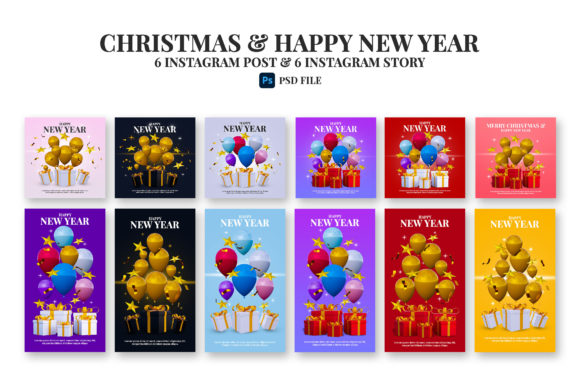
Christmas and Happy New Year Post Templates
As the holiday season approaches, creating standout social media content becomes a priority for many. Whether you are a small business owner, a blogger, or simply someone who loves sharing festive moments, having the right design tools makes all the difference. A Christmas and Happy New Year post template bundle offers a practical, time-saving solution for producing polished visuals without needing advanced design skills.
This particular bundle includes 12 PSD files, available in both square (2500x2500 pixels) and vertical (1080x1920 pixels) formats. These dimensions cover Instagram feed posts and Stories, giving you flexibility across platforms. What makes this set stand out is the inclusion of 3D elements, smart objects, and fully editable layers. You can replace images, adjust colors, and resize elements without losing quality. The transparent background feature further simplifies compositing, allowing you to layer graphics seamlessly.
What Makes This Template Bundle Valuable
At its core, this collection is designed to help you produce professional-looking holiday content quickly. Instead of starting from scratch, you begin with a well-organized file where everything is already laid out. The smart object feature lets you drop in your own photos simply by double-clicking a layer. This is especially useful for product shots, personal portraits, or brand imagery.
The inclusion of 3D elements adds depth and visual interest. These are not flat graphics; they have volume, shading, and realistic lighting effects. When used in a Christmas and Happy New Year post, such elements make the design pop, catching the viewer’s eye as they scroll through their feed. The combination of festive typography, seasonal icons, and dimensional objects creates a modern, creative look that feels fresh rather than generic.
Another practical aspect is the resolution. High-resolution files ensure your images look crisp on any screen, whether viewed on a smartphone, tablet, or desktop. This is important for maintaining a professional appearance across different devices. The help file and free font download links further reduce friction, so you spend less time troubleshooting and more time creating.
Who Will Find These Templates Useful
The audience for this bundle is broad, but it particularly benefits those who need consistent, quality visuals without hiring a designer. Freelancers, for example, can use the templates to offer holiday-themed social media packages to clients. A simple change of the main image and text transforms the design from a generic template into a client-specific post.
Small business owners often juggle multiple responsibilities. During the busy holiday season, creating original graphics from scratch can be overwhelming. With editable layers, you can quickly update the text for different promotions, events, or greetings. One day you might promote a Christmas sale, the next you could share a New Year message. The same base design adapts to both needs with minimal effort.
Bloggers and content creators also benefit. A cohesive visual theme across your holiday posts builds brand recognition. Using the same template collection ensures a consistent look, while the ability to swap images keeps each post unique. Educators and hobbyists who manage community pages or event announcements will appreciate the straightforward editing process. Even beginners with basic Photoshop knowledge can achieve professional results by following the organized layer structure.
Practical Use Cases for Holiday Posts
Understanding where and how to apply these templates helps you get the most value from them. Below are a few realistic scenarios that illustrate the versatility of the bundle.
Personal Greetings and Family Updates
Imagine you want to send a warm holiday greeting to your Instagram followers. With the 1080x1920 pixel template, you can create a vertical Story post featuring a family photo. The smart object makes image replacement simple. You add the photo, adjust the text to include a personal message, and the 3D elements provide a festive backdrop. The transparent background option also allows you to export elements individually, so you can reuse them in other projects like digital cards or invitations.
Business Promotions and Seasonal Campaigns
A retail store can use the square 2500x2500 pixel template for a product showcase. Place a featured item inside the smart object, add a holiday discount message, and the 3D elements draw attention to the offer. Because the layers are editable, you can change the color scheme to match your brand. If you have multiple products, you can duplicate the file and swap images, generating a series of posts that maintain a unified look. This consistency helps your feed appear curated and intentional, which builds trust with your audience.
Event Announcements and Countdowns
Nonprofit organizations or community groups hosting holiday events can use these templates for announcements. The modern design with 3D elements gives an energetic, celebratory feel. You can customize the text for event details, dates, and call-to-action buttons. The high resolution ensures the graphics also work well for printed materials like flyers or posters, if needed. The included help file guides you through the process, making it accessible even if your design experience is limited.
Key Considerations Before Using the Templates
While this bundle is user-friendly, a few points are worth noting to ensure a smooth experience.
- Software Requirements: The PSD files require Adobe Photoshop or a compatible program that supports layered files. If you do not own Photoshop, free alternatives like GIMP or Photopea may work, but smart object functionality is best supported in Photoshop. Check your software compatibility before purchasing.
- Font Licensing: The bundle includes free font download links. Always review the font license terms, especially if you plan to use the designs for commercial purposes. Some free fonts have restrictions on resale or usage in branded materials.
- 3D Element Customization: While the 3D elements are included as part of the design, remember that they are pre-rendered graphics. You can resize and reposition them, but altering their core appearance may require advanced 3D software. This is not a limitation for most users, as the elements are already designed to complement the templates.
- Layer Organization: The files are described as well organized, which typically means folders and naming conventions are used. Take a moment to explore the layer structure before editing. Understanding where smart objects, text layers, and effect layers are located saves time and prevents accidental changes.
- Output Resolution: Both provided sizes are high resolution. Keep this in mind when exporting. For Instagram, saving as PNG or JPEG with sRGB color profile ensures colors appear correctly across devices. The transparent background option is especially useful if you want to overlay the design onto other backgrounds.
Getting Started with Your First Edit
If you are new to working with PSD templates, the process is straightforward. Open the file in Photoshop and locate the smart object layer, usually named something like "Your Image Here." Double-click its thumbnail, which opens a separate document. Paste or place your image, save, and close that document. The template updates automatically. Next, select the text layers and type your own message. The 3D elements remain in place, adding depth without any extra work on your part.
Experiment with different images to see how the smart object handles various content. Photos with good contrast and clear subjects work best. Because you can resize all objects without compromising quality, you have freedom to adjust the layout to suit your specific content. If you need to modify colors, look for adjustment layers or layer styles that control hue and saturation. The well-organized structure makes these adjustments accessible even for beginners.
Combining Templates for a Consistent Feed
One approach that experienced creators use is to mix the 12 templates across their holiday posts. Use one design for the main greeting, another for a product highlight, and a third for a behind-the-scenes look. The shared 3D elements and typography create a visual thread that ties everything together. Your audience sees a cohesive series rather than isolated posts. This technique strengthens your brand identity and makes your profile more memorable.
For businesses, this consistency directly supports marketing goals. When customers see a familiar visual style, they associate it with your brand. Over time, this builds recognition and trust. The bundle provides a foundation that you can build upon year after year. Save your edited files, and next holiday season you only need to update the images and text, rather than redesigning from scratch.
Why Modern Design Elements Matter
The inclusion of 3D elements is not just a decorative choice. Social media feeds are crowded, especially during the holidays. A Christmas and Happy New Year post that uses dimensional graphics stands out from flat, text-heavy alternatives. The subtle shadows and highlights give the design a tactile quality that draws the viewer in. Combined with the clean, modern layout, the templates feel current without being overly trendy. This balance ensures they remain effective for multiple seasons.
The transparent background feature also adds versatility. You can extract individual 3D elements and use them in other projects, such as email headers, website banners, or printed cards. This extends the value of the bundle beyond Instagram alone. Thoughtful design choices like these reflect a focus on practical utility, which is exactly what busy users need.
Final Practical Observations
When you invest in a template bundle, you are essentially buying time and consistency. The Christmas and Happy New Year post templates covered here offer both. The learning curve is minimal, the output quality is high, and the flexibility to edit layers means you are never locked into a single look. For personal users, the templates remove the stress of design during a hectic season. For professionals, they provide a reliable system for delivering client work efficiently.
Take advantage of the help file and free font download before you start. Set aside a short block of time to customize the templates for your needs. Once your files are set up, you can publish a whole series of holiday posts in minutes. That efficiency lets you focus on what really matters: connecting with your audience, celebrating the season, and enjoying the moments that make the holidays special.