Louvre Keynote Template: A Practical Evaluation for Professional Presentations
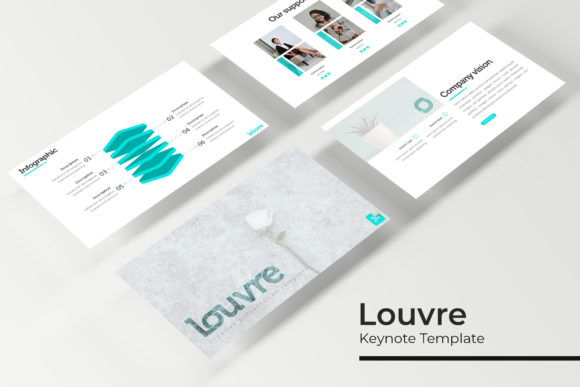
The Louvre Keynote Template is a presentation design system built for Apple Keynote that offers 150 total slides structured across five distinct color variations. Each color set includes 30 slides, giving users a consistent foundation while allowing for visual variety depending on the context or brand requirements. The template is built on Master Slides, which means that any changes made to the master layout automatically propagate across all slides using that layout, saving time and ensuring design consistency throughout a presentation. Additional features include handcrafted infographics, section break slides, gallery and portfolio slides, resizable and editable graphics, picture placeholders with drag-and-drop functionality, and pixel-perfect illustrations. The package includes five PPTX files in widescreen format, a Readme file, and a link to download the free font used in the design. Notably, the template does not include the photographs or images shown in the preview; those are for illustration purposes only.
What the Louvre Keynote Template Offers
When evaluating a presentation template, it helps to understand what is actually included versus what is implied by marketing materials. The Louvre Keynote Template provides a complete slide deck structure rather than a one-off slide design. With 150 slides spread across five color variations, users have access to a substantial library of layouts without needing to design from scratch. The five premade colors are intended to suit different presentation contexts, such as corporate branding, creative portfolios, educational content, or event presentations. Each color variation stands alone as a full 30-slide deck, which means a user could select one color scheme and build an entire presentation without mixing elements from other color sets.
One of the more practical features is the use of Master Slides. This approach is common in professional template design because it allows for rapid global edits. If you need to change a font style, adjust a color accent, or reposition a recurring element, you can do so on the master slide and every slide linked to that master updates automatically. This is particularly valuable for users who need to adapt a presentation for multiple stakeholders or update branding elements after the initial build. The picture placeholders are another time-saving feature: they are pre-sized and positioned, so you can drag and drop an image into the frame without manually cropping or resizing it each time. For users who frequently work with images, this reduces friction and helps maintain visual consistency.
Why Someone Might Consider This Template
There are several reasons a person researching Keynote templates might evaluate the Louvre Keynote Template. One is the volume of included slides. Having 150 slides across five color variations means you are not limited to a single look or forced to reuse the same layout repeatedly. For longer presentations, training materials, or decks that need to cover multiple topics, this variety can help keep the audience engaged. Another consideration is the inclusion of handcrafted infographics. Infographics can be time-consuming to build from scratch, especially when you need them to match a specific color palette and typography system. Having them pre-designed within the template saves time and ensures they integrate visually with the rest of the deck.
The gallery and portfolio slides are relevant for creative professionals, agencies, photographers, or anyone who needs to showcase work visually. These slides are designed to present images in a structured way, with placeholders that keep the layout clean even when swapping images. Similarly, the section break slides help with pacing. In longer presentations, section breaks give the audience a visual cue that a new topic is beginning, which can improve comprehension and retention. The pixel-perfect illustrations mentioned in the feature list suggest that the vector elements are sharp and scale well across different screen sizes, which is important for presentations displayed on large monitors or projectors.
Benefits and Tradeoffs to Consider
One clear benefit of the Louvre Keynote Template is the consistency it provides. Because all slides within a color variation share the same design language, transitions between slides feel cohesive. This is especially important in professional settings where presentation quality reflects on the presenter or organization. Another benefit is the resizable and editable graphics. Vector-based graphics can be scaled without losing quality, and being editable allows you to change colors, text, or shapes to match specific needs. For users who need to localize presentations or adapt them for different audiences, this flexibility is useful.
However, there are tradeoffs to consider. One is that the template is designed for Keynote, which means users of other presentation software such as PowerPoint or Google Slides will need to work with the included PPTX files and may lose some formatting fidelity during conversion. While PPTX is a widely compatible format, certain Keynote-specific features, such as magic move transitions or specific animation behaviors, may not transfer cleanly. Another tradeoff is that the five color variations are premade, which limits customization for users who need a very specific brand color that falls outside the provided schemes. Although you can edit colors manually, doing so across 30 slides per variation requires effort, and the result may not be as cohesive as a professionally built custom template.
The absence of included photography is another practical consideration. The preview images are for illustration only, so users must supply their own photographs. For someone who has a library of high-quality images, this is not an issue. For someone who needs stock photography, it adds an extra step and potential cost. Additionally, the template relies on a specific font, which is available via a free download link. While free fonts are convenient, they may not always be licensed for commercial use depending on the specific font license. Users should verify the font license if they plan to use the presentation in a commercial or client-facing context.
Situations Where the Louvre Keynote Template Is a Strong Fit
The Louvre Keynote Template is well suited for professionals who need to produce a polished presentation with minimal customization effort. This includes corporate teams preparing quarterly reports, marketing professionals building pitch decks, or educators creating course materials that need a consistent visual structure. The infographic slides are useful for data-heavy presentations where you need to communicate statistics, processes, or comparisons clearly. The gallery and portfolio slides are a good match for designers, photographers, architects, or anyone in a visual field who needs to present a body of work in a structured format.
Another strong fit scenario is when you need to create multiple presentations for different audiences that should feel related but distinct. Because the template offers five separate color variations, you could use one color set for an internal board meeting and another for an external client presentation, while maintaining the same overall layout structure. This saves design time and ensures that both presentations look professional. The Master Slides feature also makes it easier to apply branding updates across multiple presentations if your organization rebrands or if you need to align with a client's guidelines.
Situations Where Alternatives May Be Worth Considering
If you need a presentation template that includes a library of stock photography or illustrations as part of the package, the Louvre Keynote Template may not fully meet that need since the preview images are not included. In that case, a template that bundles royalty-free images could save you the additional step of sourcing visuals. Similarly, if you work primarily in PowerPoint or Google Slides and find that PPTX files often break during conversion, you might be better served by a template built natively for that software. While the template includes PPTX files, the design was originally created for Keynote, and some nuances may not survive the format conversion perfectly.
Another scenario where alternatives might be worth exploring is when your brand colors are very specific and fall outside the five premade color variations. While you can manually recolor elements, doing so thoroughly across 30 slides is time-consuming. Some template providers offer fully customizable color palettes or allow you to choose colors at the point of purchase. If your presentation needs to match an exact hex code for branding compliance, a fully editable template with no preset color limitations could be a better fit.
Additionally, if you need highly complex animations or interactive elements, a standard template like this one may feel limiting. The Louvre Keynote Template is designed for static and slide-based presentations with standard transitions. For users building interactive dashboards, non-linear presentations, or advanced animations, a custom solution or specialized template would be more appropriate. Finally, if your presentation is very short, such as a 5-to-10 slide deck, having access to 150 slides may feel excessive. While you can certainly use only a subset of the slides, you may be paying for variety you do not need. In that case, a smaller, more focused template could offer better value.
Practical Decision-Making Insights
When evaluating the Louvre Keynote Template against your own needs, start by clarifying the context and audience for your presentation. If you are building a presentation that requires visual consistency across multiple sections, and you value the ability to make global edits quickly, the Master Slides approach is a practical advantage. Consider how much time you want to spend on layout and formatting. If you want to focus on content rather than design, a template with pre-built infographics, section breaks, and image placeholders reduces the time spent on those tasks.
Also consider your technical comfort level with Keynote and format conversion. If you are a Keynote user, the template is likely to work smoothly. If you use PowerPoint primarily, test a sample slide from the PPTX file to see whether the formatting holds up before committing to the full template. Pay attention to font licensing: confirm that the free font linked in the Readme file is licensed for your intended use, whether that is internal, commercial, or client-facing. If you need to present on a device that does not have the font installed, consider whether the template includes fallback fonts or whether you will need to embed or substitute fonts manually.
Finally, think about the longevity of the presentation. If you are creating a one-time deck for a single event, a template like this can be a fast solution. If you are building a presentation that will be updated and reused over time, the Master Slides structure and editable graphics make it easier to maintain. In either case, the Louvre Keynote Template provides a substantial starting point, but its fit depends on how well its design language, color options, and included features align with the content you need to present and the software you use to present it.