Haval Keynote Template: A Versatile Toolkit for Polished Presentations
If you’ve spent any time building slide decks, you know the difference between a presentation that lands and one that gets ignored often comes down to design. You don’t need to be a graphic designer to make your slides look sharp, but you do need the right foundation. That’s where the Haval Keynote Template comes in. It’s a comprehensive template system built to save time, maintain consistency, and give you a professional look without the hassle of starting from scratch.
Instead of offering just a single theme, this package gives you 150 total slides spread across five distinct color variations, each with 30 slides. That means you’re not locked into one aesthetic. You can switch between color schemes depending on the audience, the topic, or the tone you want to set. Whether you’re pitching to investors, teaching a workshop, or presenting a quarterly report, having those options at your fingertips makes a real difference.
What Makes the Haval Keynote Template Stand Out
A lot of presentation templates look good in the preview but fall apart when you try to customize them. The Haval Keynote Template avoids that problem by relying on Master Slides. This means any change you make to the master layout automatically updates across all slides that use it. You don’t have to manually adjust every single page. If your brand colors shift or you need to add a new section, you make the change once and it propagates everywhere.
Another strength is the inclusion of handcrafted infographics. Instead of generic charts, you get visuals that are built to communicate data clearly. Combined with resizable and editable graphics, you can adapt each element to fit your specific numbers or narrative. The picture placeholders work on a simple drag-and-drop basis, so adding your own photos or screenshots takes seconds.
The template also provides pixel-perfect illustrations. That might sound like a small detail, but when you project slides on a large screen or share them as PDFs, crisp lines and sharp icons keep the presentation looking clean and professional.
Five Premade Color Schemes for Different Contexts
Having five color variations baked into the template is more than just a nice visual perk. Each color palette can change how your content is perceived. For example, a muted, neutral palette works well for formal business proposals or academic conferences, while a bolder palette might suit creative pitches or product launches. You get five PPTX files, one for each color scheme, plus a widescreen format in each. That means you can test which one resonates best with your audience without rebuilding your deck.
Section Break Slides That Improve Flow
Long presentations can feel like a wall of information if there aren’t natural pauses. Section break slides act as visual breathers. They signal to the audience that you’re moving to a new topic or a new phase of the discussion. The Haval Keynote Template includes dedicated section break slides, which help structure your narrative and guide attention. When you pair these with a portfolio or gallery slide, you also have a built-in way to showcase examples, case studies, or client work without cluttering the main content.
Real-World Applications Across Professional and Creative Settings
Because the template offers so many slide types and color variations, it works across a wide range of use cases. Here are a few practical scenarios where it really shines.
- Business pitches and investor decks: You need clean, confident slides that don’t distract from your message. The master slide structure ensures consistent branding, while the infographics help you present market data or traction metrics in a way that’s easy to digest.
- Educational workshops and training sessions: Teachers and trainers often need to break complex ideas into manageable chunks. Section break slides let you segment your curriculum, and the editable graphics let you tailor examples to your subject matter.
- Creative portfolios and client showcases: If you’re a designer, photographer, or agency owner, the gallery and portfolio slides give you a polished way to present your work. The drag-and-drop picture placeholders make it fast to swap in your latest projects.
- Internal company updates and reports: Quarterly reviews or team meetings don’t have to look like spreadsheets. With the handcrafted infographics, you can turn KPI data into visuals that tell a story, making your updates more engaging for your colleagues.
- Marketing webinars and product demos: When you’re presenting to potential customers, first impressions matter. The five color variations let you match your brand identity, while the resizable graphics help you highlight product features in a clear, compelling way.
How the Template Improves Efficiency and Workflow
Time is probably your scarcest resource. Starting a presentation from a blank slide forces you to make hundreds of small decisions about layout, color, typography, and spacing. Using a template like this eliminates most of those decisions upfront. You’re not spending your energy on formatting; you’re spending it on content and delivery.
Because everything is built on Master Slides, you can also hand off the template to team members or clients without worrying about design drift. Everyone works from the same foundation, which keeps the final output cohesive even when multiple people contribute slides. The included readme file and free font download link make setup straightforward, so you’re not hunting down resources mid-project.
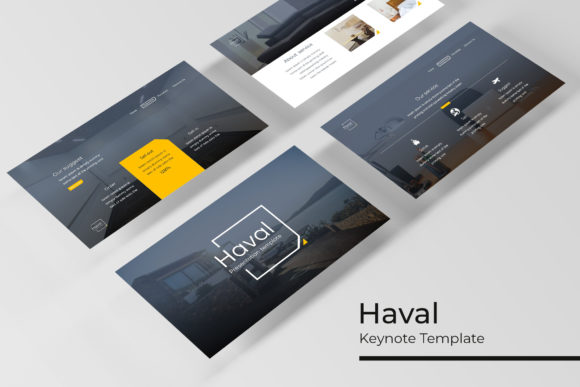
One thing to keep in mind: the photographs shown in the preview are for illustration only. You’ll need to supply your own images, but the drag-and-drop placeholders make that integration painless. If you have a library of brand-approved photos or stock images, you can drop them in and maintain a consistent visual style.
Practical Considerations When Choosing a Template
Before you commit to any template, it’s worth thinking about how your presentation will be delivered. The Haval Keynote Template comes in PPTX format, which means it works with Keynote as well as with PowerPoint if you need to collaborate with Windows users. The widescreen aspect ratio is standard for most modern projectors and monitors, so you won’t have to worry about letterboxing or awkward cropping.
If you often present on the go, having five prebuilt color files means you can carry multiple versions of a deck without extra file management. You might use one color scheme for a client-facing pitch and another for an internal review. That flexibility is valuable when you’re juggling different audiences and don’t have time to rebuild slides from scratch.
Another aspect to consider is the learning curve. Because the template relies on Master Slides and editable graphics, there’s a small upfront investment in understanding how those elements work in your presentation software. But once you get the hang of it, the payoff in efficiency is substantial. If you’re new to working with master layouts, the readme file included in the package gives you guidance on getting started.
Why Versatility Matters for Your Presentation Strategy
Most people underestimate how often they present. Between client meetings, internal updates, conference talks, and webinars, the average professional probably delivers more presentations than they realize. Having a template that adapts to different contexts means you’re always ready to communicate clearly, regardless of the setting.
The Haval Keynote Template is designed to bridge the gap between a fully custom design and a mediocre default template. It gives you the structure and polish of professional design while keeping the customization process simple enough that you don’t need a design background to use it effectively. The handcrafted infographics, pixel-perfect illustrations, and section break slides all contribute to a polished final product that helps your audience focus on your message rather than the visual noise.
If you value clean branding, efficient workflows, and the ability to switch between visual styles without rebuilding your deck, this template offers a practical solution that works across personal, professional, educational, and commercial environments. It’s not about flashy gimmicks; it’s about giving you a reliable toolkit so you can present with confidence and clarity.