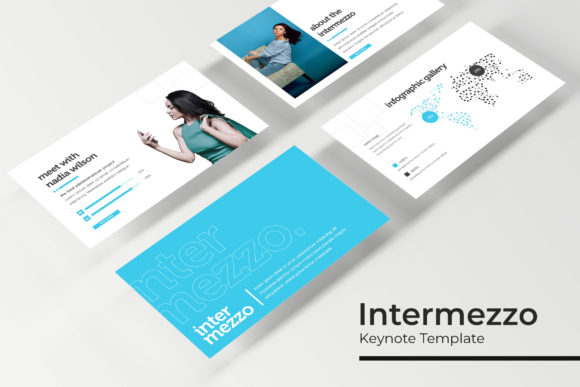
Intermezzo Keynote Template
Presentations are often the moment where ideas either take off or fall flat. The right template does not just make slides look good—it shapes how your message lands, how your audience remembers it, and how much time you save building it. Intermezzo Keynote Template offers a complete presentation system with 150 total slides across five distinct color variations, each containing 30 carefully designed slides. For professionals, creators, educators, and entrepreneurs who regularly communicate through presentations, having this kind of structured flexibility can shift the entire experience from stressful to seamless.
Why a template with 150 slides matters for your workflow
Most presentation templates give you a handful of slides and expect you to adapt them to your needs. Intermezzo takes a different approach by delivering 150 slides organized into five complete color themes. Each theme includes 30 slides that cover everything from title layouts to data visualizations to portfolio galleries. This means you are not starting from scratch or forcing one design to fit multiple purposes. Whether you are pitching a new product, teaching a workshop, or presenting annual results, you have a dedicated slide for each part of your story.
Having 30 slides per color variation allows you to build a full narrative without repeating layouts. You can introduce your topic, break down complex information with infographics, showcase work in gallery slides, and close with a strong call to action—all within a single cohesive design language. For busy professionals who value efficiency, this eliminates the back-and-forth of searching for the right slide type or manually adjusting formatting.
Five premade colors and five color variations for brand flexibility
Color consistency is one of the most visible signs of a polished presentation. Intermezzo Keynote Template includes five premade color schemes, each applied to its own 30-slide set. This gives you the freedom to choose a palette that aligns with your brand, your industry, or the tone of your message without needing to adjust every slide manually. If you present to different audiences throughout the year, you can switch between color variations to keep your content fresh while maintaining the same structure and quality.
For entrepreneurs and small business owners who wear multiple hats, this built-in variety saves hours of design work. Instead of creating a new presentation from scratch for each client or project, you can select the color variation that fits best and populate it with your content. The result is a professional, consistent look that builds trust with your audience.
Handcrafted infographics and section break slides
Data and structure are often the hardest parts of a presentation to make engaging. Intermezzo addresses this with handcrafted infographics that transform numbers, timelines, and comparisons into clear visual stories. These are not generic charts—they are thoughtfully designed graphics that guide the viewer's eye and make complex information easier to absorb. Whether you are presenting market research, project milestones, or educational content, these infographics help your audience grasp key points quickly.
Section break slides are another practical addition. They give your presentation a clear rhythm, signaling transitions between topics and giving your audience moments to reset. This is especially useful in longer presentations, training sessions, or portfolio reviews where pacing matters. Instead of jumping abruptly from one topic to the next, you can use section breaks to create a natural flow that keeps people engaged.
Gallery and portfolio slides for visual storytelling
For photographers, designers, architects, and other creatives, the way you display your work is as important as the work itself. Intermezzo includes dedicated gallery and portfolio slides that let you showcase images cleanly and professionally. Picture placeholders make it easy to drag and drop your own visuals, so you can update your portfolio quickly for different clients or projects.
These slides are designed to let your work stand out without distracting backgrounds or cluttered layouts. The focus stays on the images, while the template provides a consistent frame that elevates your presentation. For freelancers and agencies who regularly pitch to new clients, having a polished portfolio slide deck ready to go can make the difference between a memorable impression and a forgettable one.
Resizable and editable graphics with picture placeholders
One of the most frustrating parts of working with templates is discovering that elements are fixed and cannot be adjusted without breaking the design. Intermezzo Keynote Template is built with resizable and editable graphics, giving you full control over every visual element. You can resize shapes, adjust layouts, swap colors, and reposition components to fit your specific content. This level of flexibility means the template adapts to your message, not the other way around.
The picture placeholders support drag-and-drop functionality, which simplifies the process of adding your own images. Instead of cropping, resizing, and aligning photos manually, you simply drop them into the placeholders and the template handles the rest. This is especially valuable when you are working under tight deadlines and need to produce a polished presentation quickly.
Master slides and pixel-perfect illustrations
Master slides are the backbone of a well-structured presentation. Intermezzo is built on master slides, which means any change you make to the master layout automatically applies across all related slides. This saves time when you need to update headers, footers, or background elements across an entire deck. For marketers and educators who frequently update presentations with new data or content, this feature ensures consistency without manual effort.
The pixel-perfect illustrations included in the template add a level of polish that sets your presentation apart. Every icon, shape, and graphic is crafted with precision, so your slides look sharp on any screen, from laptops to projectors. This attention to detail matters when you are presenting to discerning audiences who notice quality.
What is included and practical considerations
Intermezzo Keynote Template comes with five PPTX files, each with a widescreen format and a unique premade color scheme. A Readme First document provides setup instructions, and a free font download link is included so you can match the original design exactly. All graphics and layout elements are fully editable within PowerPoint, and the template is based on master slides for easy global changes.
It is worth noting that photographs shown in the preview are for illustration purposes only and are not included with the template. This is standard practice, but it means you will need to supply your own images. For most users, this is an advantage because it allows you to use your own brand visuals, product photos, or personal work. However, if you prefer a template that includes stock imagery, you may need to source those separately.
Who benefits most from Intermezzo Keynote Template
This template is especially valuable for professionals who create presentations regularly and need a reliable, flexible system. Marketers can use the gallery slides for campaign recaps and the infographics for performance data. Educators can structure lessons with section breaks and illustrate concepts with handcrafted graphics. Entrepreneurs can build investor pitches or client proposals quickly by selecting the right color variation for each audience.
Freelancers and creative professionals will appreciate the portfolio slides and editable graphics that let them tailor each presentation to a specific client. Small business owners who present to different stakeholders—partners, customers, teams—can maintain consistent branding across all their decks while saving hours of design time. The template also works well for internal teams where multiple people need to contribute to a presentation, because master slides ensure that everyone stays aligned.
Practical use cases and recommendations
When I think about the situations where Intermezzo Keynote Template really shines, a few scenarios come to mind. Imagine preparing a quarterly review for senior leadership. You need an executive summary slide, a data section with clear infographics, a section break before diving into each department's results, and a gallery slide for key achievements. With 150 slides across five color sets, you can build this presentation in minutes rather than hours.
Another example is a photographer or designer preparing for a client meeting. The portfolio slides allow you to present your work professionally, and the picture placeholders make updating the deck for each client effortless. You can even create multiple versions of your portfolio in different color schemes to match each client's brand.
For educators and trainers, section breaks help structure long sessions into digestible modules, and infographics simplify complex theories or data sets. The ability to edit graphics means you can customize visuals to match your specific curriculum or training material.
Potential fit considerations
While Intermezzo Keynote Template is a comprehensive solution, it is built for PowerPoint (PPTX format). If your workflow is primarily in Google Slides or Apple Keynote, you may need to convert the files and check for compatibility. The template's strength lies in its depth—150 slides is a lot of content, and not every project needs that many slides. For a short internal memo or a five-minute update, you may use only a fraction of what is available. That said, having the extra slides available means you can scale your presentation up if the scope expands.
Users who prefer highly minimalist or experimental design aesthetics may find Intermezzo more structured and polished than avant-garde. Its strength is in professional clarity and versatility rather than bold visual disruption. If your brand identity calls for something unconventional, you may want to compare this template with others that offer more stylistic risk-taking.
Final thoughts on Intermezzo Keynote Template
A good presentation template does more than decorate slides—it shapes how your message is received and how much effort you invest in preparation. Intermezzo Keynote Template delivers a complete, flexible system with 150 slides, five color variations, handcrafted infographics, portfolio and gallery layouts, editable graphics, and master slide control. For anyone who creates presentations with regularity and cares about both quality and efficiency, this template offers a practical foundation that saves time while elevating your work.
The most effective presentations are those where the audience focuses on the content, not the design. By using a template that handles the design structure thoughtfully, you free yourself to concentrate on what matters most: your message, your story, and the outcome you want to achieve.