Why Pastelle Power Point Template Helps You Create Professional Presentations Faster
If you have ever spent hours trying to make a slide deck look polished, you already know the struggle. You open PowerPoint, stare at a blank slide, and the clock ticks away while you adjust fonts, align shapes, and search for a colour palette that does not clash. The Pastelle Power Point Template was built to solve exactly that problem. It is not just a collection of slides. It is a structured system designed to cut down your design time, maintain visual consistency, and let you focus on your message rather than formatting.
Many professionals, educators, freelancers, and small business owners share the same challenge. You need a presentation that looks modern and credible, but you do not have a graphic design background. You also need it fast. Maybe you have a client pitch tomorrow, a board meeting on Monday, or a workshop to deliver by the end of the week. The pressure is real, and the default PowerPoint themes rarely give you the flexible, handcrafted look you want. That is where a well-made template like Pastelle becomes a practical resource.
The Real Challenge Behind Presentation Design
Creating a deck from scratch involves many decisions: choosing a colour scheme that works across all slides, making sure fonts pair well, placing images without distorting them, and keeping every slide aligned. When you are doing this under a deadline, it is easy to end up with inconsistent layouts, mismatched colours, and slides that feel disconnected. The result is a presentation that distracts your audience instead of supporting your story.
Another common pain point is variety. A template with only ten or fifteen slides often forces you to reuse the same layout over and over, which makes your deck feel repetitive. Audiences notice that. They pick up on the lack of visual pacing, and it can make even strong content feel flat. You need enough slide types to build a narrative flow, such as section breaks, portfolio pages, infographics, and gallery layouts, all working together under one unified design language.
Then there is the issue of customisation. Even if you find a template you like, adjusting colours or swapping images can break the design. Elements shift, proportions get distorted, and you spend more time fixing problems than actually preparing your content. This is especially frustrating when you are not a design expert. You need a template that stays intact when you make changes, one that lets you drop in your own photos and text without worrying about alignment or spacing.
How Pastelle Power Point Template Addresses These Needs
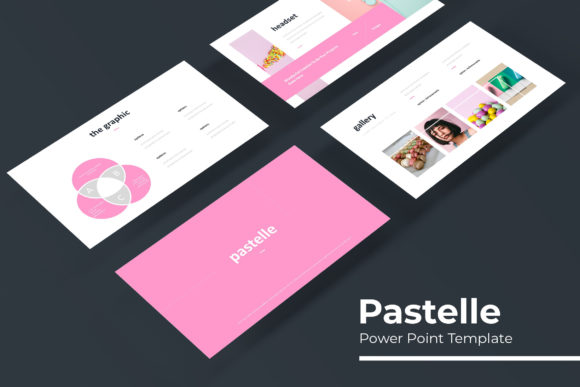
The Pastelle Power Point Template is built around the idea of giving you a complete, ready-to-use system that still leaves room for your own creative input. With 150 total slides spread across five pre-made colour variations, you get 30 slides per template. That means you are not stuck repeating the same layout for ten consecutive slides. You can build a presentation that has rhythm: a stunning cover slide, clear section breaks, data-rich infographics, and a polished portfolio or gallery page when you need to showcase work or products.
Each of the five colour variations is fully standalone, so you can choose the palette that best fits your brand, your topic, or your audience. If you are pitching a creative agency, one colour scheme might feel more vibrant. For a corporate quarterly review, another might communicate stability and professionalism. Because each variation is a separate PPTX file, you can also experiment by mixing elements from different colour sets if you want a more custom look. The flexibility is built in from the start.
One of the most practical features is the handcrafted infographic slides. Data visualization is often the hardest part of a presentation to get right. Bar charts, process flows, timelines, and comparison graphics need to be clear and visually appealing. The Pastelle template includes infographic layouts that are already designed with clean lines, proper spacing, and a consistent colour palette. You simply replace the placeholder text and numbers with your own data. This saves hours of manual chart building and keeps your deck looking professional.
Section break slides deserve a special mention because they are often overlooked in less comprehensive templates. Section breaks act as visual punctuation in your presentation. They tell the audience, "We are moving to a new topic now." Without them, transitions can feel abrupt. Pastelle includes dedicated section break slides that let you announce each new part of your story with a clear, attractive page. This small detail has a big impact on how your audience follows your narrative.
The gallery and portfolio slides are equally valuable for anyone who needs to showcase images. Whether you are a photographer, a real estate agent, a product manager, or a consultant sharing case studies, being able to present multiple images in a clean layout is essential. These slides use picture placeholders that allow drag-and-drop image insertion. You do not need to crop or resize images manually. The template handles the proportions, so your photos always fit perfectly within the design framework.
Practical Applications for Different Users
The way you use the Pastelle Power Point Template will depend on your role and the type of presentation you are building. A marketing professional, for instance, might rely heavily on the portfolio and gallery slides to present campaign results or client work. The handcrafted infographics would help turn engagement metrics into a visual story that is easy for stakeholders to digest. The section break slides would keep the deck organized across different campaign phases.
An educator or trainer might approach the template differently. For them, clarity and readability are top priorities. The clean typography and high-contrast colour combinations in the pre-made variations ensure that slides are legible even on a large screen in a brightly lit room. The master slide-based structure means that consistent headers, footers, and branding elements appear automatically on every slide. That is a huge time saver when you are preparing a multi-day workshop or a semester-long lecture series.
Small business owners and freelancers often have to create presentations for multiple purposes on a tight budget. The Pastelle template gives you five distinct colour variations in one purchase, so you can create decks for different clients or different parts of your business without buying separate templates each time. The pixel-perfect illustrations included in the design help you maintain a polished look without needing to source custom graphics. You can also combine elements across the five files to create a completely unique look if you have the time to experiment.
Agency professionals who pitch regularly will appreciate the speed the template offers. When you have a pitch due in 48 hours, you cannot afford to build every slide from zero. With Pastelle, you open the PPTX file, choose your colour variation, replace the placeholders with your content, and your deck is structurally complete. You can then focus on refining the message, practicing the delivery, and tailoring the narrative to the client's needs. The template does not lock you into a rigid format. The resizable and editable graphics mean you can adjust any element if you need a specific layout.
What You Get and How to Get Started
When you download the Pastelle Power Point Template, you receive five PPTX files, one for each colour variation. All files are in widescreen format, which is the standard for most modern screens and projectors. A Read Me first document explains the font requirements and includes a free download link for the fonts used. This ensures your presentation renders exactly as designed, without missing fonts or broken layouts. The template relies on free fonts, so there are no additional licensing costs.
It is important to note that the photographs or images shown in the preview are for illustration only. They are not included with the template. However, the picture placeholders are designed to make your own images look just as polished. As long as you use high-quality photos of your own, the final result will be consistent with the professional style shown in the preview.
Because the template is built on master slides, any changes you make to the master layout will automatically apply to all slides that use that layout. This is especially useful for applying a consistent logo, background, or footer across the entire deck. You do not have to edit each slide individually. This master slide architecture also means that if you ever want to change the colour scheme across all slides at once, you can do it from the master view without breaking individual slide layouts.
Practical Recommendations for Getting the Most Out of It
Start by reviewing all five colour variations. Pick the one that best matches your brand guidelines or the tone of your presentation. If you are unsure, choose a neutral palette and add your own accents through photos and graphics. Once you have selected your PPTX file, open it and go through the slides to see which layouts fit your content. You will likely find more variety than you expected, so take a few minutes to plan your slide sequence before you start populating text and images.
Use the handcrafted infographic slides for any data-heavy sections. Avoid cramming too much information into one slide. Instead, spread your data across multiple infographic layouts to keep each point clear. The gallery and portfolio slides are ideal for the middle or end of your deck, after you have presented your main arguments and you want to show evidence or examples. Section breaks work best right before a major shift in topic, giving your audience a moment to reset and refocus.
If you work with a team, you can share the template files and maintain consistency across everyone's presentations. Because the colour variations are pre-made, each team member can choose a variation that suits their specific project while still staying within the same design family. This is especially useful for agencies or departments that produce multiple presentations per month.
Final Thoughts on Usefulness and Implementation
The Pastelle Power Point Template addresses the core needs of anyone who regularly creates presentations: speed, consistency, variety, and ease of use. It eliminates the friction of starting from a blank slide and reduces the time spent on formatting and alignment. Whether you are a one-person business, a teacher, a marketer, or a creative professional, having 150 slides across five colour options gives you a flexible toolkit that adapts to different contexts and audiences.
The practical value lies not just in the number of slides but in how they work together as a system. Master slides keep your design consistent. Handcrafted infographics simplify data presentation. Section breaks improve narrative flow. Gallery and portfolio slides let you showcase visuals without extra work. And because everything is resizable and editable, you retain full control when you need it.
If your goal is to deliver presentations that look professional, feel cohesive, and communicate your message clearly, the Pastelle Power Point Template is a resource worth considering. It does not replace the need for good content, but it removes the design barriers that often get in the way of sharing that content effectively. That is the kind of help that saves you time, reduces stress, and lets you focus on what truly matters: connecting with your audience.